












When you launch a browser such as Chrome, Edge or Firefox, there is usually a line in the address bar saying Search Google Type a URL. Millions of people on the internet receive this message daily, but hardly any give it a thought in terms of what it means.
It is intended to simplify the process of surfing the internet. It provides users with the opportunity to either search for data on the web or navigate directly to a website by entering its address. Now, instead of separate search boxes and address bars, modern browsers do both in one place.
By knowing how Search Google or Type a URL helps users surf the internet more efficiently and how Search Google or Type a URL is responsible for discovering websites online on the internet.
What Does Search Google or Type a URL Mean?
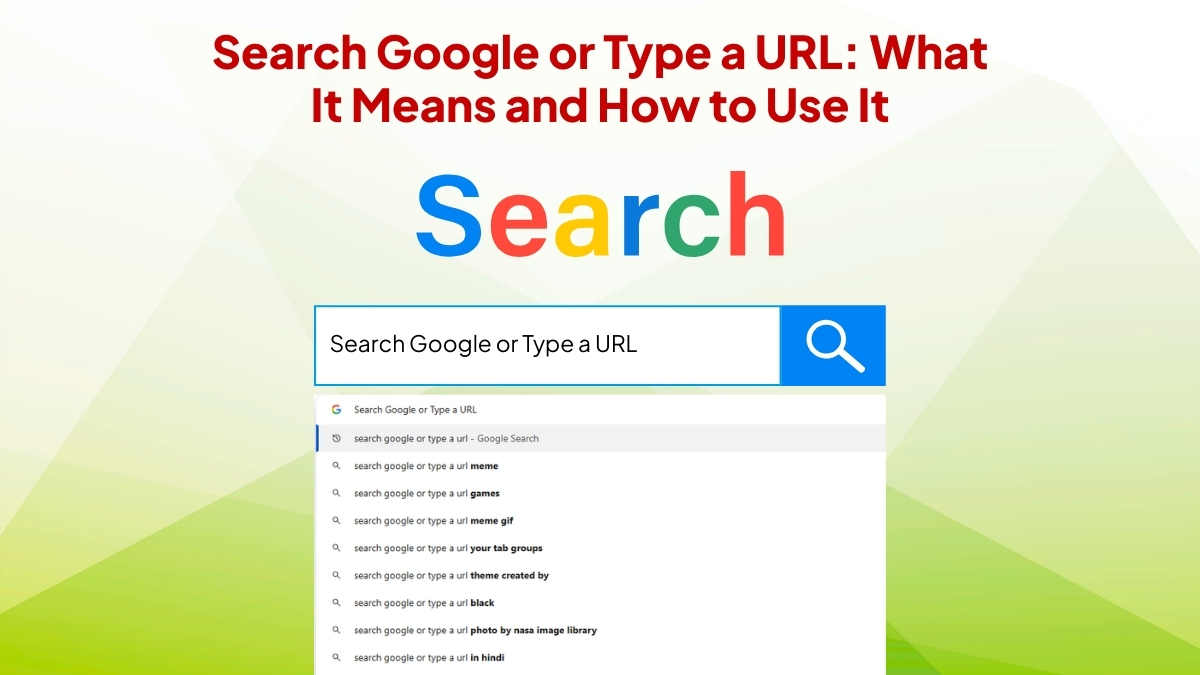
The phrase Search Google or Type a URL appears in the browser’s address bar, which is often called the omnibox. This bar allows users to perform two main actions in the same place.
You can type a search query to find information on the internet, or you can enter the direct address of a website.
For example, if you type a phrase like “digital marketing tips,” the browser will automatically perform a Google search and show related results. On the other hand, if you type a full website address such as www.example.com, the browser will open that specific website.
This dual functionality makes browsing faster and more convenient for users.
Difference Between Searching and Typing a URL
Most people don’t know that searching and typing a URL are two different actions. The browser decides for you what to do based on your typing.
Searching for Information
The browser interprets keywords, phrases, or questions inputted into the search bar as a search query, and then the search engine displays a number of websites about that subject.
Some examples include
- Best SEO strategies for beginners
- How to improve website traffic
- Digital marketing trends
In these instances users are searching for information, not a particular website.
Typing a Website Address
A person who inputs a link structure knows the site they intend to go to. Think of a URL as simply the address for the webpage.
Examples include:
- google.com
- youtube.com
- amazon.com
If a person types an address similar to the above, they can bypass search results and go right to the site.
Why Modern Browsers Use This Feature
That’s how web browsers are created to make it easier for people to find information on the internet. In fact, combining search and navigation in a single bar leads to an improved overall user experience.
Here are some important reasons why this system is used.
Convenience
Users no longer have to alternate between a search box and an address bar.
Speed
Fewer steps means getting to the writing of what you need quickly.
Smart Suggestions
Browsers automatically suggest websites, searches, and previously visited pages.
Better User Experience
Everything becomes easier, especially for users who are not very familiar with technology.
Because of these advantages, the concept of Search Google or Type a URL has become standard in most modern browsers.
How the Address Bar Understands What You Type
The address bar in your browser is smarter than it seems. It processes the text you enter and decides to either perform a search or launch a site.
If, say, you entered a normal phrase like “best laptops for work,” the browser assumes you’d like to search for information.
But if you type something that resembles a website address, the browser will try to open that actual website.
This smart behavior is the reason behind the Search Google or Type a URL feature working seamlessly for millions of users on a daily basis.
Benefits of Using This Feature
The combined search and address bar benefits Internet users for many reasons.
- Faster browsing: You can look up information before even going to Google.
- Easy website access: If you know the ID of a website, you can obtain it instantly.
- Smart auto-suggestions: Browsers remember which sites have been visited often and automatically suggest them.
- Improved navigation: It enables fast access to bookmarked pages, earlier searched items, and saved pages.
These advantages have led to most people using the address bar for nearly every online activity.
How Search Behavior Impacts Websites
And from the perspective of digital marketing, the phrase Search Google or Type a URL explains how people navigate the web nowadays.
Few people remember website addresses now. Instead, they just enter a few keywords into the browser bar and trust search engines will take care of the rest.
It suggests that if businesses want visitors, they need to focus on solid search visibility.
Now when someone searches for a topic, Google shows them the websites it believes contain the most relevant and useful information. Properly optimized SEO websites are more likely to appear in these results.
Tips for Businesses to Appear in Search Results
While owning a website can become one way to be discovered more when people are searching online, following some steps is essential for your website’s visibility.
Focus on Quality Content
Algorithms side with the content that answers users’ questions unequivocally and adds genuine value.
Use Relevant Keywords
Add keywords to your content that match what users are searching for.
Optimize Website Speed
Websites that load quickly are better for users, and in return they get a boost in search results.
Make Your Website Mobile Friendly
Mobile optimization is crucial; a high percentage of users are browsing from smartphones.
Maintain Clear Website Structure
A good page organization is beneficial for users and search engines to use your site.
Completing these steps improves the likelihood that searched users will find your website.
Common Mistakes People Make While Using the Address Bar
The system is simple, but users tend to make mistakes when surfing the internet.
One mistake we often make is entering the wrong website addresses. Even an innocent typo can send you to the wrong page or generate an error message.
A further quandary is confusing a search query with a url. Certain users attempt to input full-fledged, question-style queries into a URL format, leading to confusion.
Security risks exist when users inadvertently land on suspicious or phony websites as well. Always verify that the site address is correct before entering personal information.
Why This Feature Is Important for Digital Marketing
Search Google or Type a URL The same idea behind the Search Google or Type a URL demonstrates how much we depend on our way out of everyday life. People use them to find businesses, services and information.
What this means for companies is that a strong online presence is critical. If a site isn’t in search results, prospects may never discover it.
Techniques like content marketing and SEO optimizations, along with keyword research, allow websites to be discovered by users browsing the web.
When done right, these strategies can deliver steady traffic and new opportunities for businesses.
Conclusion
Search Google or Type a URL may seem like light functionality in your browser, but something that critical casts a huge shadow on how people navigate the web. It merges search and direct navigation in one simple tool that millions of users depend on every day.
For everyday users, it speeds up and simplifies browsing. It speaks to the growing reliance on search engines for finding information online, so if you run a business or own a website, it suggests why showing up in those results matters.
Companies learn about improved digital strategies and how to target the right audience by understanding the way they use search engines.
With the growth of the internet, searching quickly and reaching websites directly will become an integral aspect of our online presence.